
Instagram has brought a plethora of new capabilities to the dynamic realm of social media, which helps us stay connected and involved. Among them, you can see when and who is online using the active status indicator, which is only a little green dot.
A labyrinth of intricacies and possible errors, however, underlies this apparently simple function. Is that green dot really reflecting real-time activity, or is it just a digital illusion?
We’ve always wondered! Explore Instagram’s active status with us as we discover the meaning of the green dot and its implications for users managing their online presence.
So, are you ready to jump into the details and discover about “Is Instagram’s Active Status Accurate?”
Describing the active status of Instagram
When a person is actively engaging with content on Instagram, their active status will reflect that. In both direct messages and the user’s profile page, you can see this green dot next to their photo.
On top of that, Instagram displays the user’s activity level with an “Active X minutes ago” statement.
How does Instagram measure Active Status?
The number of active users on Instagram can be affected by many things.
- To start, Instagram’s active status refreshes depending on what a user has been doing recently in the app, such as sending messages, taking photographs, or looking through articles.
- Instagram shows a user’s status as active even if they aren’t using the app; all it takes is having the app open in the background.
- Notifications and background app activity might also cause a change to their active status on Instagram, which can make the information seem more up-to-date than it really is.
Generally, Instagram determines and displays a user’s active status by a combination of background operations and direct app use, which can sometimes cause mistakes or delays in reflecting actual real-time activity.
What are the elements influencing the precision of Instagram’s Active Status?
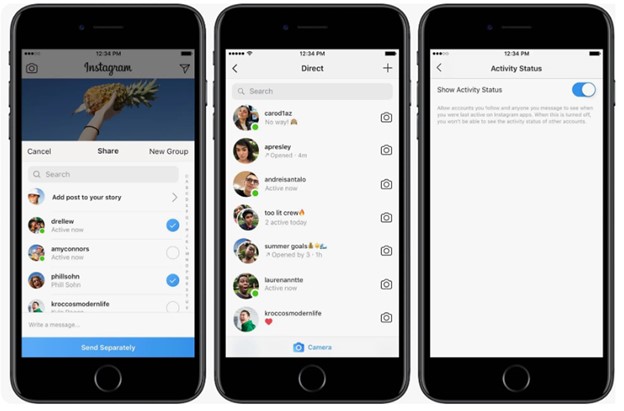
There are a number of factors that can impact the accuracy of Instagram’s active status, which in turn affects how precisely it represents a user’s activity in real-time:
- Connection issues can lead to inaccuracies in Instagram’s active status, as users with unstable connectivity might appear active even if they’re not actively engaging with the app.
- Additionally, if a user is logged into Instagram on multiple devices, their active status could reflect activity from any of these devices, potentially causing confusion about their true level of engagement.
- Privacy settings also play a role in Instagram’s active status, as Instagram allows users to turn off their active status visibility. This means that even if a user is currently active, their status may not be visible to others if they have chosen to hide it.
What are the common misconceptions about active status on Instagram?
Despite the fact that many Instagram users are under the impression that the green dot on the platform always indicates real-time activity, this is not always the case.
As a result of the possibility of a delay in status updates, the dot cannot accurately depict the level of current involvement.
In addition, a user’s Instagram status as “active” does not necessarily imply that they are now online at that particular moment; it may suggest that they have been active in the past, but it may not necessarily mean that they are currently engaged in activity that is occurring in real-time.
This discrepancy underscores the fact that the green dot on Instagram offers a broad impression of recent activity rather than an exact picture of the present existence of the website on the internet now.
Key advice for Instagram’s active status management
In the event that you prefer not to reveal your activities on Instagram, you can turn off your active status by going into the application settings.
Additionally, you are connected to Instagram on various devices. In that case, it is essential to take into consideration the potential influence that this may have on the accuracy of your visible activity status.
It is also very important to make sure that you have a reliable internet connection since problems with connectivity might result in erroneous status updates.
You will be able to retain greater control over how your activity is portrayed and prevent any possible misconceptions about your online presence if you manage these elements.
What are the effects of Instagram’s active status?
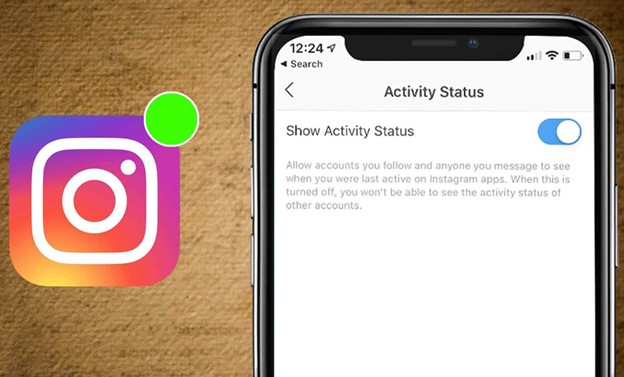
There are several consequences that the active status feature of Instagram has on the interactions and behaviour of users:
1. Improved Interactions
The first effect of being aware of when other users are online on Instagram is enhancing the chances of real-time interactions, such as comments or direct messages, which can lead to more immediate and interesting discussions.
2. Social Pressure
The other effect that the active status feature of Instagram can have is social pressure. Users can experience stress or anxiety as a result of this situation of always having to be online or reply rapidly due to the visibility of their active status.
3. Privacy Concerns
Users concerned about their privacy can choose to deactivate the Instagram active status function in order to shield themselves from prying eyes or to stop receiving unwelcome attention.
4. Perception of Availability
The green dot on the Instagram status function could mislead you into thinking someone is available when, in fact, they aren’t. Even if a user isn’t actively chatting or interacting with anybody at the moment, their status can lead users to believe otherwise.
5. Gain More Attention
Businesses and influencers can use the active status on Instagram to see when their audience is online, which might help them publish and connect with them more effectively at certain times.
Conclusion
It can seem like a clear-cut way to observe what people are up to in real-time on Instagram—the green dot denoting active status—but there’s more nuance to it than that.
There are a lot of things that can affect the accuracy of Instagram’s active status. These include things like delays in status updates, the effect of using several devices to log in, and privacy settings. Keep in mind that the green dot cannot always indicate active interaction the next time you see it.
Are you interested in learning more about the elements of social media and how they impact your online interactions?
To stay up-to-date on the newest information and advice on confidently navigating the digital world, subscribe to our blog!
In the end, also share all your data and experiences about “Is Instagram’s Active Status Accurate?” in the comment section.