
Are you wondering if Instagram notifies someone when you mark a message as unread? You’re not alone! Instagram’s direct messaging feature has added convenience, but it also brings up questions about privacy and message tracking.
In today’s digital era, Instagram and similar apps have become indispensable for maintaining relationships with loved ones and even strangers.
Thanks to innovations like direct messaging, our social interactions are now more convenient and instantaneous than ever. But fresh doubts and concerns arise alongside these innovations.
In this guide, we’ll dive into how the ‘Mark as Unread’ feature works, when you can use it, and if the sender will know when you’ve used it.
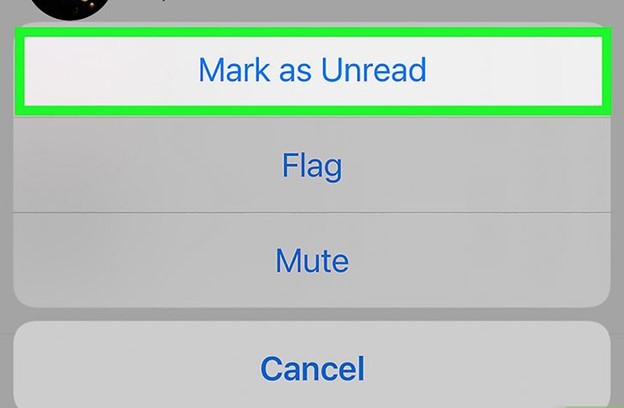
hat Is the ‘Mark as Unread’ Feature on Instagram & How Does It Work?
The “Mark as Unread” feature on Instagram is a valuable tool for users who want to manage their messages more effectively. This feature is handy for business and creator accounts, as it allows them to keep track of meaningful conversations that require attention without the risk of forgetting to respond.
- Launch the Instagram app and sign in.
- Tap the paper airplane (Messenger) icon at the top-right corner of your screen.
- Find the conversation you want to mark as unread.
- On iOS, hold the chat; on Android, tap the three dots and choose “Mark as Unread.”
Top Ways to Avoid Instagram Messages Being Mark as Seen

As it is clear, Instagram does not notify you when you mark a message as unread, which is particularly problematic if you want to read a message but don’t want the sender to know.
The good news is that there are a number of ways to stop communications from being tagged as “seen.” These are the most effective methods:
1. Use Airplane Mode to Read Messages Privately
Using Airplane Mode is a tried-and-true way to sneak a peek at Instagram messages without the sender noticing.
- Launch Instagram and go to the DM area to do this. To exit Airplane Mode and cut off internet access, tap the messages list on your smartphone. Return to Instagram and access the desired message. Be careful to exit the app entirely after seeing the notice before disabling Airplane Mode.
By doing so, Instagram will not update the ‘seen’ status. Thus, the sender will not know that their message has been seen. Even when you log out of the app and back in, the sender will still not be able to view the message. You can check your messages in Airplane Mode without alerting the sender, but you will not be able to use Instagram for any other purposes while in this mode.
2. Preview Messages Using Notifications
Even when you don’t have the Instagram app open, you can still view partial messages via push notifications. By doing so, you can get a general idea of the message’s content without really marking it as “seen.”
- Go to your device’s settings and locate the Notifications section. Enable notifications for Instagram and make sure ‘Message Previews’ are turned on. View a message from the notification bar when you receive it. This way, you’ll be able to read a portion of the message without opening the app.
Due to the possibility that the preview would not display the complete text, this approach is appropriate for less lengthy messages.
3. Use Instagram’s Restrict Feature
You can read messages without revealing the “seen” status using the Restrict function, which is meant to shield users from unwanted interactions. Once you restrict an account, all of that user’s messages will be moved to the “Requests” folder and will no longer be visible when you access them.
- Go to the profile of the person you want to restrict. Tap the three dots in the upper-right corner and select Restrict. Now, any messages they send will appear in your ‘Requests’ tab, where you can read them without marking them as seen.
An essential piece of advice is that restricting an account will not alert the sender, which makes this method of reading communications a covert one.
4. Read Messages Using Third-Party Apps (Use with Caution)
A handful of unofficial apps claim to enable you to see Instagram messages in private mode without identifying them as viewed. However, there is a potential security concern since these applications often ask for access to your Instagram account.
- Avoid suspicious applications that ask for Instagram logins.
- Use native Instagram tools like Restrict for privacy.
A helpful hint is to always do extensive research on any app before using it to guarantee that it is trustworthy and secure.
5. Turn Off Active Status
Turning off your Instagram Active Status is another excellent approach to keep your Instagram message private. In this manner, it will not be possible to tell when you were last active—even if you open a message by mistake.
- Go to your Instagram profile and tap the menu icon in the top-right corner. Navigate to Settings > Privacy > Activity Status. Toggle off Show Activity Status.
Though it won’t stop others from seeing you, this will conceal your active status, which is an excellent way to keep some privacy.
Pros & Cons of Using the “Mark as Unread” Feature on Instagram
✓ Pros
- It helps to prioritize messages that need immediate follow-up.
- It improves time management by allowing you to return to essential conversations later.
- It allows you to manage conversations during busy periods and reduces the chances of oversight.
- Sound for business and creator accounts handling high volumes of inquiries.
✓ Cons
- It may give the impression that a message has not been viewed, causing miscommunication.
- This could lead to confusion if multiple messages are marked as unread and not addressed.
- The feature is unavailable for personal accounts.
- Does not change the ‘seen’ status for the sender.
Conclusion
Although the “Mark as Unread” feature on Instagram helps manage your conversations, it doesn’t hide the fact that you’ve read the message.
We are looking for more ways to take control of your Instagram interactions. Check out our comprehensive guide on Instagram privacy settings.
Ready to master Instagram’s messaging features? Explore more insights and level up your social media game now!”
Finally, please make sure that all of the information you provide is helpful and valuable to us, and do not hesitate to share your ideas, opinions, and experiences about “Does Instagram notify you when you mark a message as unread?” with us.