
It is possible to make your postings even more enjoyable by generating videos with music and posting them on Instagram, which is a fantastic platform for sharing content.
The situation might get more complicated, however, if you have created a video in draft form and want to download it with all of its components, particularly the music that plays in the background.
There is a possibility that you will need to make use of specific workarounds since Instagram does not directly enable downloading drafts with all of its capabilities.
An in-depth tutorial that will assist you with downloading your Instagram draft video, which includes music, is provided here.
So today, in this post, we want to talk about “How to download Instagram draft video with music?” and invite you to be with us and discover tips and tricks.
What is the Instagram draft video feature?
With Instagram’s draft video function, users can save videos they’re editing as drafts, allowing them to come back to them later and tweak them before sharing.
If you’re trying to put off publishing your finished work until the last possible moment, this function is for you.
The features and functioning of the draft video feature are outlined below:
- Rather than immediately publishing a video in progress, you have the option to store it as a draft on Instagram. When you’re still honing the content, effects, and music, this is the way to go.
- You can save a draft of your video on Instagram and return to it later to make further changes or edits before sharing it with your audience. This entails making changes to tags, captions, or filters.
- Save Instagram videos as drafts so you can organize and prepare your material in advance. This will help you have a consistent flow of content that is ready to publish.
- With Instagram’s many drafts feature, you can save several versions of a video or post and publish them when it’s convenient for you.
Instagram drafts: A user’s guide
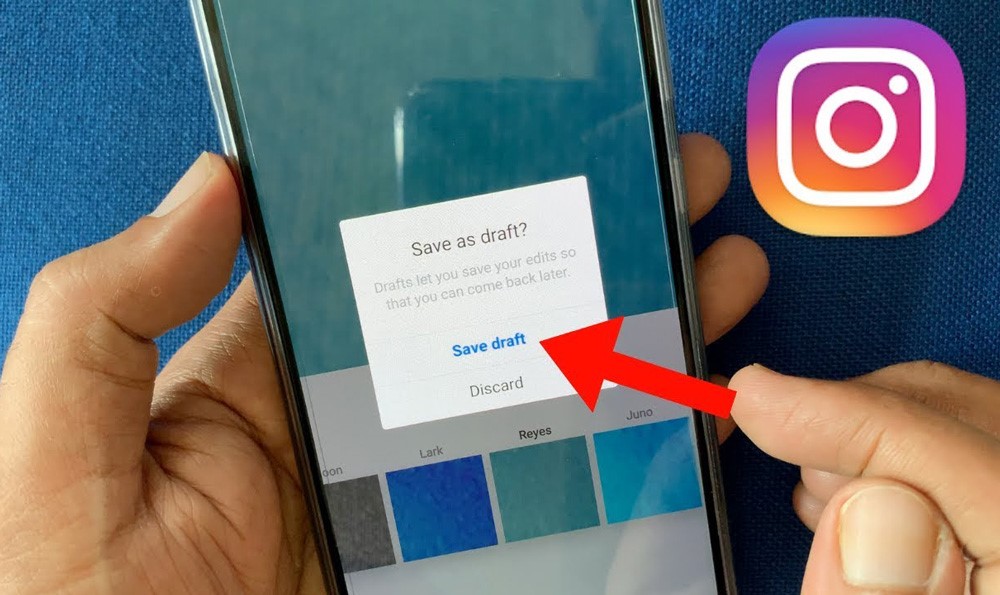
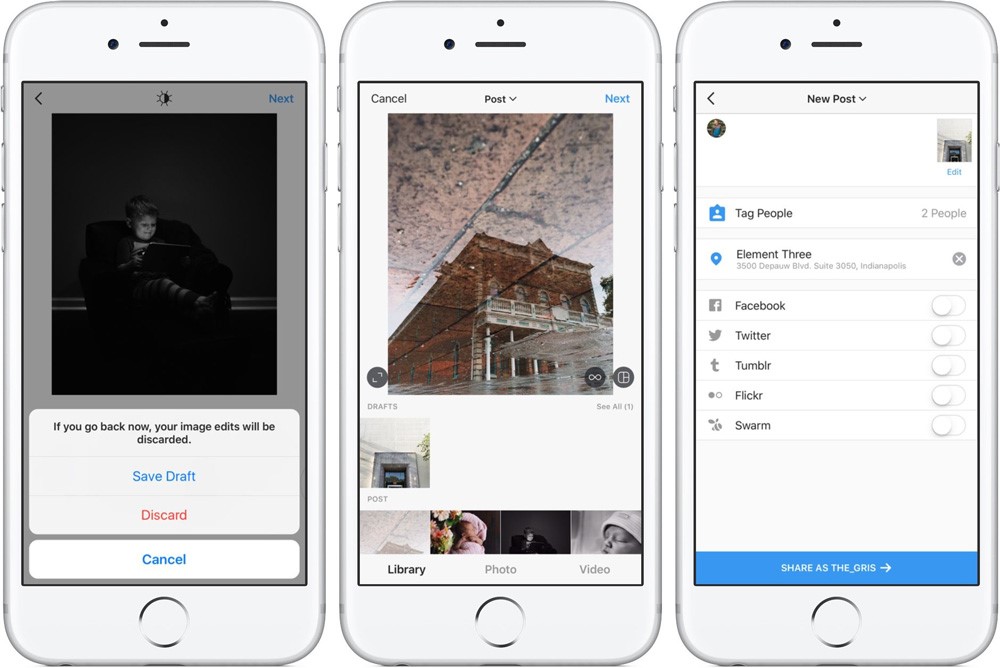
If you want to save and organize your Instagram posts for later editing, using drafts is an excellent method to do it.
A comprehensive tutorial on making the most of Instagram drafts is available here:
- Launch Instagram and press the “+” symbol to begin making a new post.
- Click “Post” and then either choose an existing video or start recording a new one.
- You can add filters, subtitles, and tags to the video in the editing section.
- Use the “Back” or “Save Draft” buttons to save your changes before publishing.
- When you want to see your saved drafts, press the “+” button once again and then choose “Drafts.”
- There will be a rundown of all the drafts you’ve saved. To make changes or publish a draft, just tap on it.
- To modify a draft, choose it. Edit the video, description, and tags as needed.
- When you’re happy with the video, hit “Share” to share it on your story or feed.
What are the positive aspects of Instagram Drafts?
You can enhance your content production and social media management with the help of Instagram’s draft function. It provides various advantages.
Some benefits of utilizing Instagram drafts are as follows:
- You can work on content whenever you want without feeling rushed to publish, giving you more freedom.
- This way, you can stay on top of your blogging schedule by planning and scheduling posts.
- Instagram video drafts also help with quality control as they allow you to go back and make sure your content is up to par before it goes public.
- You can manage your social media presence more efficiently and professionally with this mix of consistency, flexibility, and quality control.
Now that ultimately be familiar with the Instagram video draft feature, the question comes to mind is that “How to download an Instagram draft video with music?”
Is it possible to download your Instagram draft video with music? (4 alternative methods)
Since Instagram does not provide a direct way to download drafts, it might be tough to save an Instagram video with music that is still in the editing process.
Nonetheless, you can save your rough-cut Instagram videos with all of their components intact by using one of the numerous workarounds.
The best approaches are as follows:
1.Save the Draft Video
Launch the Instagram app on your mobile device to begin saving your draft video.
To start a new post, tap the “+” symbol. To see your saved drafts, tap “Drafts” at the bottom of the screen.
After that, choose the rough cut of the video that you want to save. You can see and edit the draft here before moving on to the download process.
2.Post the Video Privately
If you want to share your videos privately, you should start by giving them one more tweak to make sure the music and footage are up to par.
When you’re done, go into your privacy settings and change the audience to “Only Me.” That way, no one else will be able to see the post.
At long last, upload the video to your profile. While getting the video ready to download, this way lets you keep it secret.
3.Download the Posted Video
To access your profile and download the private video you uploaded, go to your profile by touching your photo in the lower right corner of the screen.
After that, go back to the post that you shared before. “Save Video” is an option that appears when you press the three dots (more choices) on a video post on a mobile device.
Keep in mind that this feature may not be accessible on all devices or versions of Instagram. For desktop usage, you can install an add-on for your browser or utilize an online downloader like InstaDownloader to save the video. Consider that the tool is a popular solution.
4.Screen Recording
You can use the screen recording capability of your smartphone as an alternative to the direct download approach if it doesn’t work or if you just want a more straightforward option.
On an iOS device, you can reach the Control Center by swiping down from the top right corner of the screen. From there, you may hit the “Record” button.
Use Android’s built-in screen recording capabilities or search for “screen recorder” on the Google Play Store to install third-party software.
After that, open the video on your Instagram profile. Put an end to the screen recording after the video has played out. Your video will be kept in the gallery or on your smartphone’s camera roll so you can easily view it.
Just follow these procedures, and you should be able to save your rough-cut video, including the music from the Instagram draft and everything else.
Although it may require a few additional steps, these strategies make managing and storing your Instagram stuff simpler.
Conclusion
Furthermore, despite the fact that Instagram does not provide a direct option for downloading draft videos that include music, there are a number of efficient workarounds that may assist you in saving your footage.
You can guarantee that your draft video is preserved with all of its components intact if you publish the video privately and then use either built-in or third-party tools to download it. Alternatively, you can use your device’s screen recording capability.
Do you feel ready to simplify the process of managing your videos and save your draft videos with ease?
In order to get the most out of your Instagram drafts, you should investigate these approaches right now.
In the end, it is your turn to tell us if you have any experience with “How to download Instagram draft videos with music?”