
The topic of message exposure on sites like Instagram has become more relevant in today’s digital era since our communications are often brief and private.
Direct messaging is a great way to stay in touch with friends, exchange images, and have one-on-one conversations on Instagram.
However, how can you delete a message? Am I the only one who can see it? You are not alone if you have ever wondered what happens to your unsent messages.
Learn how Instagram deals with these kinds of situations and what else you need to know to keep your interactions secret on the app.
So, are you curious about “Can someone see an unsent message on Instagram?”
Keep reading with us up to the end.
What are the details on how Instagram’s Unsend Message Function works?
In order to provide users with more control over their discussions, Instagram has introduced the “unsend” tool.
Both you and the receiver will no longer see the message when you choose to unsend it. The goal here is to permanently remove the message from the chat thread and start it again so it won’t be accessible to anybody.
Nevertheless, delving further into Instagram’s inner workings is necessary to grasp the whole extent of this function.
When you choose to unsend a message on Instagram, the following will occur:
- The moment you unsend a message on Instagram, it is immediately removed from the recipient’s inbox. After being sent, the message is usually marked as unsent and then removed from their inbox.
- Instagram does not inform the receiver when a message is unsent; nevertheless, they can get a short notice advising them that a message was withdrawn. Usually, that’s not enough time to see the video before it disappears.
- Recipients can save screenshots of unsent Instagram messages in their gallery if they captured them before the message was unsent.
- The recipient’s notification settings determine whether a preview of a message appears on the lock screen or in notifications. These previews show the message for a short time and don’t mean the recipient saw or remembered it.
Will Someone Be Able to View an Unsend Message on Instagram?
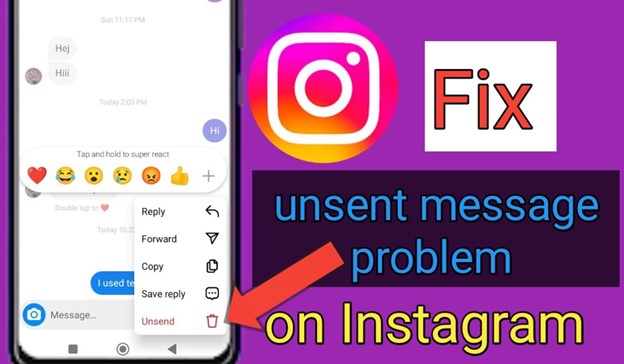
When a message is unsent on Instagram, it is removed from the conversation thread for both users, according to Instagram’s functionality.
Several important considerations are as follows:
- The receiver can get a short notice saying that a message was unsent. Nevertheless, the content of the unsent message has been omitted from this notice.
- Although Instagram doesn’t have a built-in feature to retrieve unsent messages, some third-party applications and tools claim to accomplish just that. However, these may be rather unreliable and even dangerous. It would help if you stayed away from these technologies since they might put your privacy at risk.
- The receiver will not see the message in their chat history or any alerts they get if they did not see it before it was unsent.
What Happens to Instagram Notifications When You Unsend Messages?
Instagram typically notifies the receiver briefly that a message was unsent but does not disclose the substance of the unsent message when you unsend it.
A preview of the message may have been seen by the receiver prior to its retraction if they had message previews enabled. Despite these sneak peeks, Instagram still doesn’t provide you with a full rundown of the unsent message.
Consequently, even if the message is removed from the conversation thread for both parties, the receiver could have caught a peek of it in their notification settings that show message content.
Why Can’t I Unsend a Message on Instagram? (3 Common reasons)
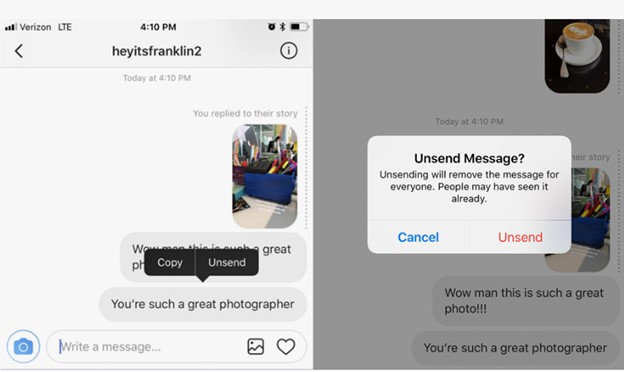
There are a number of possible causes if you are unable to unsend a message on Instagram:
- Make sure your app is up-to-date and restart it if necessary; technical issues or old versions could prevent the unsend function from operating properly.
- It may be difficult to remove the message if the internet connection is poor, which may also interfere with this function.
- Furthermore, Instagram’s servers can be down, or the receiver can have already viewed the message, making it impossible to unsend.
In most cases, you can fix the issue and get control of your messages again by checking your internet connection, upgrading the program, and verifying Instagram’s server status.
How to Keep Your Instagram Privacy Safe? (4 Practical methods)
When it comes to protecting one’s privacy in order to unsend messages on Instagram, there are a few best practices that should be chosen from:
- To avoid the hassle of having to unsend messages on Instagram, be sure to examine them well before sending them.
- Make sure no one else can access your Instagram account by using strong passwords and turning on two-factor authentication.
- Know that unsending a message will not remove the screenshot that someone took of it.
- Think about whether what you’re about to send is suitable for the platform and whether you’re okay with it being visible even after you’ve unseated it.
Conclusion
Basically, if you ever post something you later come to regret, you can undo it using Instagram’s unsend option, which is a great tool for controlling your direct messages.
Instagram does its best to hide unsent messages from both you and the receiver, but there’s always a possibility that someone may have seen or recorded the material before you could erase it.
How worried are you that others may see your unsent messages? On the other hand, are you interested in finding out how to properly manage your Instagram privacy?
To safeguard your online chats, explore Instagram’s settings, use caution while communicating, and keep up with Instagram’s news and upgrades.
Is unending a message ever a problem for you on Instagram? In what ways did you deal with it?
Post your comments and stories about “Can someone see an unsent message on Instagram?” down below!